

Introduction
whether you're a beginner needing something simple for youtube or you're a professional that requires more advanced features there's a free video editor for you so coming up i'll count down the top 5 best free video editing software for windows mac and linux going over the pros and cons of each to qualify the program must not have any forced water marks or time limits and allow for the exporter projects in a resolution of at least 1080p hd that out of the way
let's get started

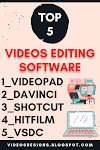
Number five is VideoPad:
Introduction of videos pad
if you're an absolute beginner VideoPad program makes it easy to get started with many cool features and the ability to share your creations directly on youtube facebook and other sites videopad has both a free and pro version while the free plan does lack some of the advanced features you do get support for stunning video effects and transitions color control video stabilization and built-in audio effects you also have the ability to export your projects in resolutions up to 4k here's a quick example of how easy it is to use to add clips from your computer just drag and drop them onto the timeline i'll add another one after the clip i just added to create a professional looking transition click the box between both clips to add a transition for this one i'll go with crossfade video pad supports a large variety of formats and is available for both windows and mac in at number
Features in Videopad
VideoPad supports frequently used file formats including Audio Video Interleave (AVI), Windows Media Video (WMV), 3GP, and DivX. It supports direct video uploads to YouTube, Flickr, and Facebook.
Number four is VSDC

Introduction of VSDC
VSDC non-linear video editor for windows only is similar to expensive programs like premiere pro and final cut pro making our top five for the first time they've made significant improvements to their interface that would have been previously described as clunky just like video pad vsdc is available with both free and paid plans with their free edition you get a ton of useful features including transitions video and audio effects masking and motion tracking it also allows up to 4k resolution for any exported project vsdc is more than just a video editor when you launch it your choices are blank project create slideshow import content video capture and screen capture along with how-to guides for its top features to quickly begin a new project select blank project in the pop-up window give your project a name you can leave the rest of these blank the others you may need to change are the output resolution and the frame rate when you're done click on finish for those of you familiar with the old interface you'll notice it's much improved while vsdc is more user-friendly than it used to be there's still a high learning curve on their website in their how-to section there's an extensive list of tutorials that will teach you how to use it
Features in VSDC
- 4K and HD Support
- Built-In DVD Burning Tool
- Color Blending And Filters
- Specific Multimedia Devices Creation
- Desktop Video Capture
- Export To Social Networking Sites
- Masking
- Non-Linear Video Editing
- Subpixel Accuracy
- Supports Popular Formats
- Video File Converter
- Video Stabilization Tool
- Visual And Audio Effects
- Work With Charts And Diagrams
- YouTube Uploader
- Capture Videos From Video Tuners, Webcams, And IP Cameras
Number three is Hitfilm

Introduction of Hitfilm
hitfilm-express is one that many people seem to have a love-hate relationship with while it is feature packed to help you create professional quality videos it does have a steep learning curve and the install process can be cumbersome let's get the positive out of the way first the base version of hitfilm express includes more than 400 effects and presets motion tracking and supports output resolutions up to 4k with no limit on the number of tracks and transitions add-on packs are also available starting at around 10 which is a great way to expand its functionality without breaking the bank now for the ugly while the hitfilm express download and install process is still a convoluted mess it's actually slightly better than it used to be we used to have to give the program a shout out on social media prior to downloading the installer now when you hit the download hitfilm express button it takes you to a pay what you want page with more features the more you pay if you want the free base version move the slider to the left and select download now fill in the required information and select send me the express download you'll now be instructed to check your mail to grab the installer in your email click the get your express installer link and finally after all of that you can now download the installer you'll first notice when you launch hitfilm express that it has a nice interface that's not overly complicated instead of dragging your media on your computer directly to the timeline you can import it from the media window or drag and drop it into the media window first prior to moving to the timeline prior to installing make sure your computer meets or exceeds the system requirements at least four gigabytes of ram and one gigabyte of video memory are needed for basic projects if you have a newer computer you shouldn't have any problems hitfilm express is available for both windows and mac
Features in HitFilm Express
- Advanced Tracking
- Screen Simulation
- Footage Distortions
- Muzzle Flash Effects
- Change Backdrop
- Blaster Impacts
- Lighting Effects
- Iconic Titles
- Create Realistic Shotgun Effects
- Grading Tools
- Import And Animate Complex 3D Models
- Recreate And Enhance Iconic Heads-Up Display
- Masking And Layering Technique
Bounce software is Openshot

Introduction of Openshot
Openshot is a free and open source program with a low learning curve that is great for beginners it's still quite buggy and if you have a load mid-tier system you may experience lag for those of you that own a mac apple imovie is an easy to use program for simple edits kn live developed for linux is another free and open source program with dozens of transitions effects and other useful features while it's also available for windows and can be run on mac os i don't recommend installing those versions at this time until the bugs get worked out and for many years lightworks has been one of our favorites for windows mac and linux it's a professional quality editor that's been used in many hollywood productions unfortunately the free license has too many restrictions including the max resolution having a limit of 720p which is no longer good enough otherwise it would have easily made our top five now let's head back to the countdown in the runner-up spot coming in at
Number two is Shotcut

Introduction of Shotcut
Shotcut open source program was developed way back in 2004 and is updated on a regular basis it's completely free and includes a ton of useful features it offers support for most audio image and video formats and allows for the export of your finished projects up to 4k the video effects include numerous filters transitions and color correction to name a few it features native timeline editing allowing you to drag and drop your media into the timeline with no limit on the number of tracks for video and audio the learning curve to use shortcut is moderate but in a short time it becomes very intuitive for example adding a crossfade is simple first drag a clip from your file manager onto the timeline add your second clip to the end of the first now left click and drag the second clip near the end of the first and let go playing it back you'll now see the crossfade between those two clips that was easy to set up shotcut is available for windows linux and mac taking
Number One is Davinci Resolve

Introduction of Davinci Resolve
the top spot at number one the absolute best free video editing software is Davinci resolve released in 2004 its free edition is quite frankly better overall and more feature packed than most paid for video editors it includes just about any feature you would need to create a professional quality project with multi-track timeline editing trimming and hdr grading tools along with support for all major file formats and resolutions up to 4k their fusion tools are built in to create amazing visual effects and motion graphics also included are their fairlight tools for audio post production it has a great layout that looks modern for those of you asking how to add transitions using davinci resolve here's your mini tutorial after you've added your clips to the timeline click edit here at the bottom of the window now drag and drop one of your clips over the top of the other in the toolbar at the top select effects library as you can see it's already selected scroll down to video transitions and select the one you want let's go with barn door left click and drag it to the portion of the clip overlapping the other and let go you'll now see a small box on top of the clip if you left click and drag the outermost edge you can change the length of the transition






0 Comments